
Covers
Native Instruments Absynth 6: the Synth and Software Review

It’s been 16 years since Absynth 5 launched. Was it worth the wait?
By Geary Yelton
Absynth is the brainchild of Brian Clevinger, a musician and self-taught programmer who started his own company, Rhizomatic Software, and released Absynth version 1 for both the Mac and Windows way back in 2000. It quickly earned attention as one the most versatile software synths around. It was the first to feature subtractive, ring modulation, FM, waveshaping, and granular synthesis under one roof. Native Instruments soon adopted it, leading to subsequent versions with even greater capabilities.
In 2022, Native Instruments announced that continuing to update Absynth would be too challenging and dropped it from their product line. Although users felt abandoned, Absynth 5 continued to function within updated Windows and Mac operating systems. Still, no updates meant no new features or product support for an extended period. Fast forward to December 2025, when Native Instruments surprised everyone by announcing Absynth 6, rebuilt from the ground up by Clevinger and in-house software programmers and designers.
New features run the gamut from an all-new graphical interface and expanded content to a unique means of finding just the sound you’re looking for. User-defined macros, new filters, and more controllable patch generation broaden Absynth’s capabilities considerably. Additional enhancements include support for MPE and polyphonic aftertouch, importing custom tuning files, and the ability to pan individual effects in surround.
Interface enhancements
The first thing you see when you open Absynth 6 is the Preset Explorer, a distinctive graphical alternative to scrolling through endless lists of presets. It’s a virtual 3-dimensional map representing hundreds of presets as colored dots. The dots are organized so that related types of sounds are bundled closely together and by color.

You audition presets by clicking on the dots or by using your computer’s arrow keys to scroll through them, and then pressing Enter or clicking again on the one you want to load. A panel of sliders lets you filter what’s displayed, classifying them by traits such as dark to bright, soft to aggressive, static to evolving, and so on. You can switch from the Preset Explorer to a more traditional list of presets with information about them. The Preset Explorer is such a handy way to quickly audition presets, I expect it will soon find its way into other Native Instruments applications.
If you’re a previous Absynth user, the other thing you’ll immediately notice is how its look has changed. Absynth 5, with its bright bluish-green stylings and oddly shaped patch elements, looks quaint and cramped in comparison. Absynth 6 looks sleeker and more serious, dominated by dark gray and black panels with medium-gray and bluish-green highlights. Although you can still type directly into data fields, you control many more parameters using sliders and knobs. In addition, you can resize the user interface from 75% to 150% of its normal size, which helps tremendously.

Macros allow you to control multiple parameters simultaneously using a single knob or MIDI message. Eight Macro knobs appear at the bottom of every page, and clicking a button reveals eight others. You can change a macro’s function in the Assign page by selecting from a list of 16 modulation types and their potential destinations. That’s also where you assign any MIDI CC# or MPE input to control the macros. One especially nice touch is that you can assign macros (and therefore MIDI) to control four envelope breakpoints in real time.

A sound designer’s toolbox
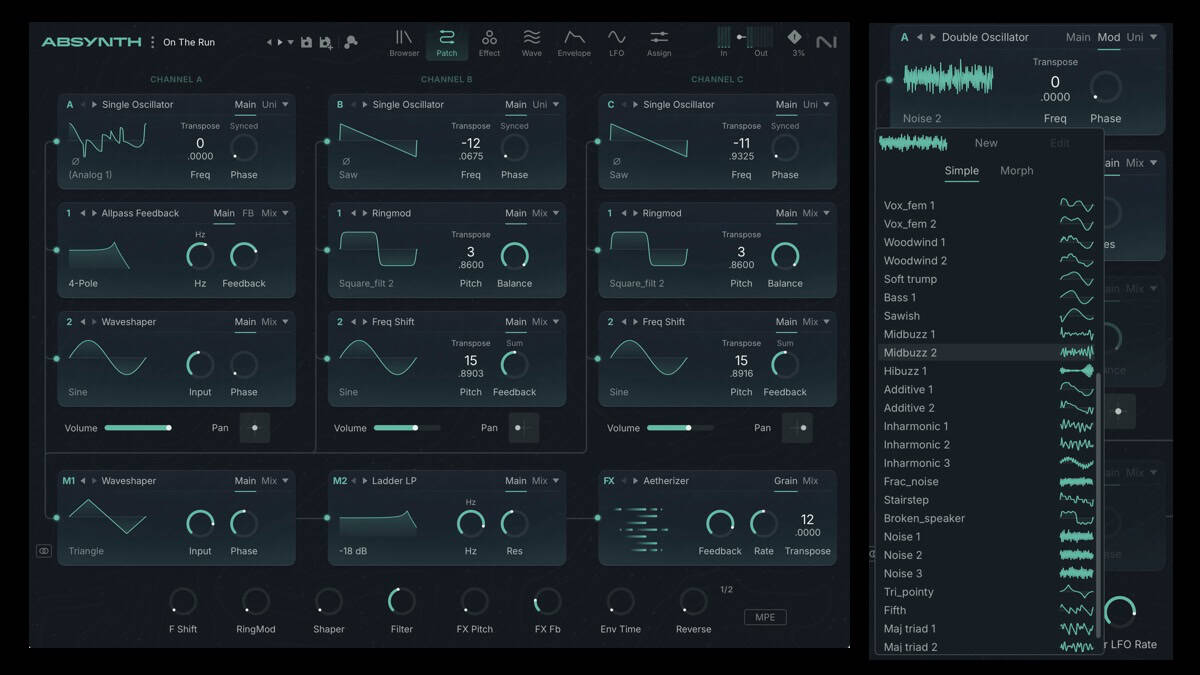
The latest Absynth retains all the flexible synthesis architecture and sound of its predecessors. In Patch view, each preset starts with as many as three oscillator channels. Each channel is shown as a patch pathway arranged vertically and comprising up to three modules, beginning with a sound source at the top.

Sound sources comprise single and double oscillators, FM and ring-mod oscillators, fractal and sync granular oscillators, and sample and granular engines, as well as a live audio input for processing external instruments. Every oscillator offers a choice of 42 single waveforms and 56 morphing waveforms. The sample and granular engines access 2.45 GB of factory samples. Samples are in WAV format, which means you can add your own samples to the factory samples too.

Downstream from each sound source are two so-called Insert modules, each offering a selection of filters, modulators, and a waveshaper, which process the source. Unlike in version 5, you also get a Mix panel to determine the balance between the original and processed signals and to adjust the module’s output level. You’ll find new ladder filters, too, with a selection of slopes. In addition, the Aetherizer and Cloud Filter (both introduced in version 5) have HD switches to enable more detailed, higher density grain clouds, increasing fidelity at the expense of higher CPU loads.

Below oscillator channels A, B, and C is the Main channel, the final mix bus before the master effects. It supplies two modules that are functionally identical to the Insert modules but apply to the entire output. The Main channel’s final stage is FX, which now allows some limited parameter control without switching to the Effect page as on prior versions.
For example, the Aetherizer effect (a granular delay) lets you change the feedback, rate, and transposition settings without leaving the Patch view. You can access additional parameters on the Effect page, which offers all the same parameters as before but with better visual feedback.
Improved features

Absynth 5 introduced the Mutator, a sound-morphing tool that generates new patches by blending parameter values from the current patch with characteristics you specify in the Browser’s tag filter. New capabilities include Mutation History—a list of previous results you can scroll though and select—as well as separate Mutation Amount and Random Amount sliders for controlling how unpredictable and how different new results are from the current preset. The new Module Lock section displays a compact view of the modules so you can determine which modules are affected by new mutations and which remain unchanged.

Complex, multistage envelopes have always helped Absynth stand apart from most synths. Instead of being limited to the four stages of typical ADSRs, Absynth envelopes let you define as many as 68 breakpoints, each specifying the value of a modulation signal at a specific point in time.
Compared with previous versions, Absynth 6’s Envelopes page features smoother visual editing, quicker access to new envelopes, and clever transform tricks like turning smooth ramps into punchy steps or auto-filling long timelines with repeating pulses. These updates make crafting intricate, tempo-locked rhythms or slow-evolving swells feel less like manual labor and more like sculpting with smart shortcuts.
On the Wave page, a dedicated waveform editor is a significant improvement over version 5’s more scattered workflow. It centralizes real-time previewing, drawing tools, and transforms like harmonic stretches and cycle warps, enabling fast single-cycle builds and sample hybrids. Any waves you save instantly play back in the patch, allowing you to audition how they interact with oscillators, envelopes, LFOs, and filters in real time. This instant feedback avoids the previous version’s save and export steps and reload delays, making sound design more fluid and direct.
Version 6’s granular engine delivers denser, more continuous grain clouds than v5’s thinner, intermittent textures, stacking them thick for seamless pads, evolving drones, and atmospheres with real weight. A piano sample shifts from a sparse mist to orchestral depth using density controls and slow sweeps, preserving Absynth’s signature shimmer while adding sustain and motion.
Final thoughts
If you’re looking to simulate acoustic instruments realistically, Absynth is probably not the synth for you. However, it absolutely excels at electronic, ambient, and surreal textures and imaginary instruments. It has long been my go-to synth for otherworldly sounds in particular. Thanks to envelopes with many breakpoints, it lets you create twisting, evolving sounds that other synths can’t—sounds that take you on journeys and tell stories.
For sound designers, Absynth’s multiple synthesis engines and wealth of user parameters make it a veritable theme park. Along with all the content of previous versions, it has more than 400 fresh presets and almost a gigabyte of new sample content. Exploring Absynth 6’s factory library, featuring presets from the likes of Brian Eno and Kaitlyn Aurelia Smith, proves just how capable it is for creating truly original sounds.
Absynth runs standalone or as a plug-in in popular formats and requires more processing muscle than previous versions. It also requires a relatively up-to-date OS on your computer—at least macOS 14 Sonoma or Windows 10. Unlike many software synths, it lacks any built-in note sequencing or arpeggiation features, but you can easily find those functions elsewhere.
Absynth has long been one of the top five virtual instruments I reach for, both in the studio and for live performance. It was getting quite long in the tooth since its last update in January 2021 and its discontinuation in September 2022. This revamped, modernized version is just about everything an Absynth user could hope for. The $99 upgrade is a no-brainer, as is the $199 purchase price if you don’t own it already.
If you have any doubts, download the demo version that times out every 30 minutes before you buy.
Prices: $199, upgrades $88


Native Instruments Absynth 6: the Synth and Software Review

Sounds Created from Hans Zimmer’s Personal Library

ELI Announces Four-Section ParaDyn™ Parametric EQ Plug-in

New Drum Farm Eurorack Module


