
Cardinal Software Modular Synth – the Synth and Software Review

It’s a self-contained version of the free VCV Rack modular softsynth, and we discuss additional options.
There are two ways to look at the modular synthesizer program called Cardinal. From one angle it’s an excellent and useful addition to the world of music software. From another angle, maybe not so much. In order to put those two views in perspective, we’ll have to start with some background.
Modular synthesizers are a wonderful resource for electronic musicians, but they’re not the easiest to learn and use. Also, hardware modulars tend to be large and expensive. A software modular synth that lives in your computer is less sexy to look at, but software modulars are a lot less expensive and offer other conveniences, such as being able to save and reload your patches.
Several software modulars are available, and each of them has some excellent features, but in my opinion the best of the bunch is VCV Rack. In its basic form, VCV Rack is entirely free, though there are some power-packed modules that you can only get by paying for them. Still, more than 3,000 free modules are available in the VCV library. Also, VCV is natively polyphonic, with up to 16 independent voice channels. Most other modulars (including the hardware kind) can produce several independent voices at once, but each voice will be monophonic.
Three thousand modules is a lot. If you’re new to modular synthesis, sorting through the VCV Library web page will probably be enough to curl your toes. Wouldn’t it be nice if there was a one-download distribution of VCV to take away the pain, so you can get started more easily?

Figure 1. By setting the zoom level on Cardinal’s browser, you can see a lot of modules at once. Alternatively, you can zoom in. Better still, use the Brand or Tags drop-downs in the upper left to find the module you want. A Favorites feature is also implemented.
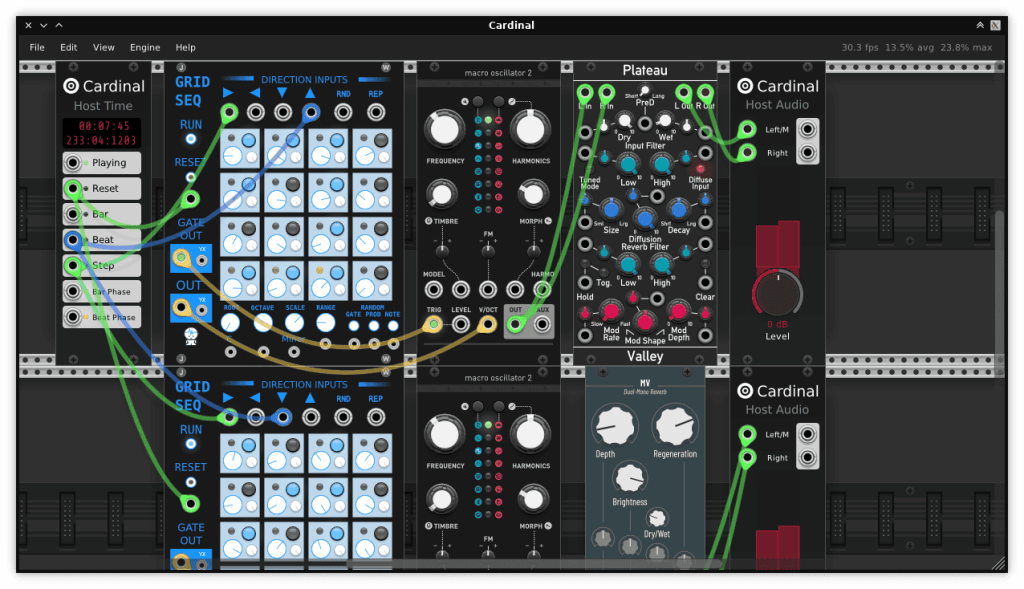
That’s where Cardinal comes in. Cardinal is exactly that: it’s a one-stop, self-contained version of VCV Rack. Make no mistake, it’s still a powerful synth, and not exactly entry-level. Currently Cardinal bundles more than 1,200 modules, some of which are shown in the Browser in Figure 1, including those from many of the important third-party sources in the VCV community such as AS, Audible Instruments, Bogaudio, Impromptu, JW, MindMeld, ML, Stoermelder, Surge XT, and Valley.
There’s plenty to keep you busy learning the system and making music. If you never use Cardinal for anything other than to add reverb from the Valley Plateau module to your mixes, as seen in Figure 2, you’re on a roll: Plateau is a seriously wonderful reverb.

Figure 2. A great-sounding reverb, Valley Plateau, running in Cardinal in a DAW.
In this write-up I’m not going to go into the details of Cardinal’s user interface, nor describe what it’s like to use it. The owner’s manual for VCV Rack is available online here. Just about everything there will transfer directly to Cardinal, because at a basic level Cardinal is VCV. It looks the same, and it operates in the same way.
There are a few differences. In VCV you select a MIDI input directly in the MIDI input module. In Cardinal stand-alone, you use the Enable/Reconnect MIDI command in the Engine menu.
When I accidentally clicked Enable Audio Input in this menu, Cardinal’s output started clicking – and that menu item can’t be deselected. Once it’s turned on, it’s turned on until you quit Cardinal. I thought this might be due to my ASIO driver being set to the wrong sample rate, so I switched from 44.1kHz to 48kHz. Switching caused Cardinal to crash, and when I re-launched it, there was still clicking with the new sample rate.
My tentative conclusion is that audio input in the stand-alone doesn’t work in Windows. Needless to say, VCV itself doesn’t suffer from this problem. And Cardinal’s audio input worked fine in my tests when it was inserted as an effect in a DAW.

In VCV itself, you can select an audio output (ASIO or something else) directly in the audio output module. Not in Cardinal. When running as a stand-alone, Cardinal routes audio to a default that doesn’t seem to be low-latency, and the user has no say in the matter. You can set the buffer size in the Engine menu, but doing so seems only to affect the internal DSP; it has no audible effect on the latency. When Cardinal is running as a plug-in in a DAW, fortunately, the DAW handles the audio I/O, so if you’re using ASIO in the DAW, there’s basically no latency.
Cardinal has a couple of things the free version of VCV Rack doesn’t have. With VCV, you have to pay $149 for the Pro version if you want to run it as a VST plug-in in your DAW or, alternatively, insert other VST plug-ins into Rack in order to use them as sound sources or effects. Cardinal is happy to handle both of those musical chores for free. There are some other differences between Cardinal and Rack; for a chart listing them, click here.
Here’s where the picture starts to get murky, though. If you should happen to want to expand your Cardinal installation by adding some of those tempting modules on the VCV Library page, either some of the free modules that are not included in the Cardinal build or maybe a couple of the more tempting paid ones, forget about it. You can’t. Cardinal is open-source, but its configuration is fixed. Only experienced computer programmers have any hope of being able to add new modules, and the only way to do that will be by downloading the Cardinal source code, making changes, and compiling it yourself.

Cardinal’s chief developer, Filipe Coelho, included only VCV modules that are open-source and that have a particular license. As a result, some of the modules that I often use, such as the filters from Vult and the utilities from Nysthi, are not included. Don’t misunderstand: there are plenty of filters and utilities in Cardinal. In particular, the Liquid Filter from Audible Instruments has a warm, rich sound.
Coelho’s primary desire seems to have been to transform VCV into a fully open-source project. The reasons for this are explained here. If you’re not a Linux power user, portions of the explanation may seem esoteric or even irrelevant, but my impression is that Coelho comes from the Linux world. Linux people have opinions about software.
Cardinal includes a few sets of modules, notably those from Aria Silvatrice, that are not available in VCV Rack 2.x for one reason or another. Aria’s take on the step sequencer concept is quite interesting. But on the whole, what’s missing is more significant than what’s added.
Hosting a VST synth or effect inside of Cardinal is done using a module called Carla. Carla is another of Coelho’s projects. Its user interface is rather intimidating, there is no real documentation, and apparently it has to be downloaded separately in MacOS and Linux computers, though it’s included in the Windows version of Cardinal. Since Carla has been around for more than ten years, the fact that there’s no documentation is an unpleasant surprise. I emailed Coelho to ask if maybe a manual was available and I just missed it, but he didn’t reply. Oh, well. If you can figure out how to patch it, hey, it’s free.

For many people, the advantages of Cardinal will outweigh the issues. Being able to build your own VCV patches and run them as plug-ins in a DAW without having to pay for the privilege is terrific, though of course it’s the income from the sales of Rack Pro that allows Andrew Belt to continue developing VCV Rack. Paying for the music gear you use is actually a good thing, it’s not a problem.
Another option to consider, if your machine runs MacOS or iOS, is miRack. Again, this is a repackaging of VCV Rack with a smaller module set. MiRack costs a modest $14.99. It currently has about 800 modules, including some (such as those from Nysthi and Lindenberg Research) that aren’t in Cardinal. I haven’t tested miRack, but according to the information on the website, it can run as an AU or VST plug-in in other music systems within the Mac sphere. Plus, it’s touchscreen-capable. For $15, that’s pretty sweet.
If you’d like to discover the wonders of software-based modular synthesis without being locked into a specific pre-configured system, however large that system may be, going straight to VCV Rack may be the right choice. To get started, you can download the free version, and I recommend adding the module sets from the developers listed above, plus 4ms, Befaco, Computerscare, Count Modula, docB, Frozen Wasteland, Nysthi, Submarine, Venom, and Vult. (Note that Vult, MindMeld, and other developers also have non-free offerings, which are certainly worth looking at.)
Later on, when you’ve learned the basics of patching with VCV, you can decide whether to buy Rack Pro to use it as a plug-in in your DAW, or whether to grab Cardinal specifically for that purpose.

To add modules to your VCV installation, you’ll have to go to the VCV Library web page, then select a given developer from the drop-down menu and click the +Add button beside each individual module that you want. Once you’ve done this, when you launch VCV you’ll see a red dot on the Library menu header in the VCV user interface. Use that menu to download all of the modules you’ve selected. This is the not too laborious process that Cardinal bypasses. With Cardinal, everything is bundled together and ready to go.
Whether you choose Cardinal, miRack, or VCV Rack, if you’re new to modular synthesis you may want to check out the series of tutorial columns I did for Synth & Software a few years ago covering the basics (https://synthandsoftware.com/2020/03/jim-aikins-modular-synthesis-for-beginners-series/). When you’re ready to go beyond the basics, a fellow named Omri Cohen has an absolutely stellar series on YouTube in which he delves into advanced techniques.
One final factor to consider is the size of the user community. At this writing, the website patchstorage.com has more than 7,900 VCV patches you can download, compared to 290 for miRack and 116 for Cardinal. Nothing else on patchstorage has anything like the community support that VCV Rack enjoys. For comparison, a hardware synth-in-a-stompbox called Zoia comes in 2nd on patchstorage with 1,426 patches. In the software universe, an Apple-only modular called Drambo is 2nd to VCV Rack with 644 patches. These stats aren’t conclusive, but they’re highly suggestive.
To be strictly fair, you can probably download and use any of the Cardinal patches on patchstorage, because Cardinal is a fixed system. With downloaded VCV patches, you may or may not have the right modules. And to answer the question that may have popped into your head, no, you can’t load VCV patches into Cardinal or miRack, nor vice versa.

It’s great to have choices. I’m glad Cardinal is an option, because it will be exactly what some musicians need – a powerful, no-nonsense modular synthesizer that can integrate pretty seamlessly with your DAW. And when you’re ready to move uptown, working with VCV Rack won’t baffle you, because you’ll already know how to make it sing. Or growl. Or shriek. Or throb. Or flap around like a pterodactyl. Whatever.
Price: free version


