
Covers
Presonus HD8 USB-C Audio Interface: the Synth and Software Review

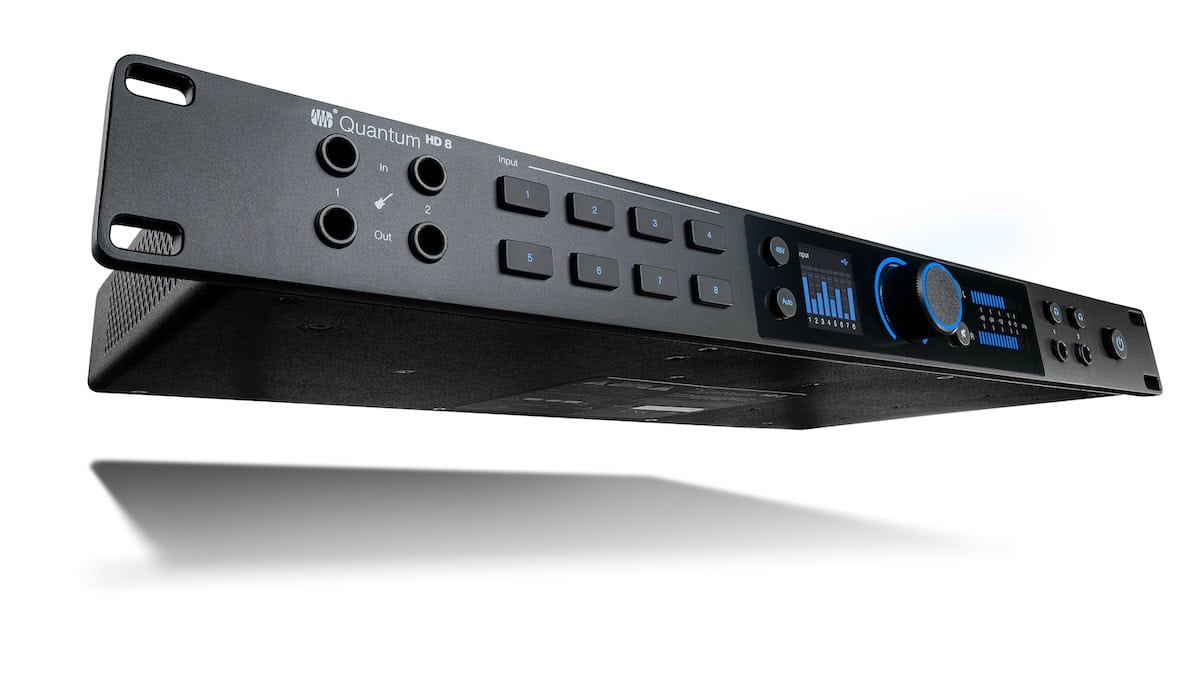
26 ins, 30 outs, a unique easy reamping feature make it a contender
PreSonus’ audio interfaces have a reputation for low latency performance, high quality preamps, excellent converters, and overall quality. Their new Quantum HD8, which continues that tradition, shows that people need not have worried when Presonus was acquired by Fender. More than that, this interface has some great features that were developed with Fender’s engineers.
The HD8 connects to any computer device with USB – Mac, Windows, or a mobile device. It uses Presonus’ driver on a computer, but on mobile devices it uses the USB driver built into the operating system.

This unit is billed as a 26×30 interface. The 26 ins start with eight mic preamps, each with a rear panel combo jack that accepts both XLR and ¼-inch connectors. You have to appreciate the convenience of having Inputs 1 and 2 repeated on the front panel with ¼-inch jacks.
The rear panel also features eight ¼-inch analog line outputs. There are ADAT optical inputs and outputs – two each on the rear panel as well, adding 16 channels of I/O at 44.1 or 48kHz, or eight channels at 88.2 or 96kHz.
A single DB-9 connector on the rear panel accepts the included breakout cable with stereo S/PDIF and 5-pin MIDI DIN in and out. Those of us who have older synths will appreciate PreSonus’ chose to continue providing these traditional MIDI jacks.

BNC word clock I/O is also provided on the rear panel. It often sounds better if you use them (or the S/PDIFs) for clock when you’re using the optical I/Os for audio. Digital clock tends to be more solid and result in less jitter.
The front panel also features eight pushbuttons for channel editing selection, a Main button for overall output level control, a main output mute button, a 48V button for toggling phantom power on and off (per channel), and indication of which channels have phantom power applied.

The preamps offer a nice high pass filter at 80Hz with a slope of 12dB/octave. This is useful in a number of situations, for example avoiding vocal pops.
There are two headphone outputs, each with a button that selects it for level control. The HD8 has two displays: the color display, which shows real-time metering, parameter values, and other menu information; and the LED output level display.
Very prominent on the front panel is the main illuminated knob, which is the sole variable control for editing. It changes color to indicate what kind of editing is currently underway.
Re-amping
The interface features two ¼-inch instrument inputs, co-developed with engineers from Fender specifically for guitar and bass. More exciting are the two ¼-inch re-amping outputs right next to those inputs.

Ostensibly, these are for sending dry guitar signals out to amps (and/or stomp box signal processors) with mics on them, returning the guitarist-sculpted, pleasantly amplified signal back into your DAW. But you can also get great results from running synths through a miked guitar amp.
Re-amping normally requires additional hardware and exertion. Being able to do it so easily is not just nice, it’s straight out awesome!
Configuration
I found controlling the interface via the front panel controls simple enough, but I prefer to control over as many hardware devices as possible from my main computer. PreSonus obliges with its Universal Control app, which accesses every function that can be controlled on the interface’s front panel.
It also has configuration management for its connections, and you can store multiple setups on drives. This is very handy for different tracking and monitoring scenarios.
On that note, the HD8 has a direct monitoring feature: the interface’s inputs can be routed directly to its outputs, bypassing the computer for latency-free monitoring. The unit can switch between two sets of stereo monitors, and the analog outputs can be configured for multichannel monitoring scenarios.

The software allows the interface to be used as a standalone mixer, albeit one with very few features. Bottom line, the software is very capable, and being able to control the interface remotely is an excellent feature.
Gain
The HD8 has another, rather exciting feature: an automatic gain setting. You simply push the button, play at the loudest level you expect to play for about ten seconds, and its sets the gain automatically. It seems to err on the side of caution, dialing up an input level that’s unlikely to cause clipping.
The interface can automatically set gain for all eight of its analog inputs simultaneously, which is very handy for a run-and-gun drumkit scenario. This feature will be popular for musicians without formal engineering training or experience, but of course input gain can also be set manually.
PreSonus includes a one-year subscription to Studio One Professional, their digital audio workstation. Of course their DAW integrates nicely with the Quantum HD8, but the hardware also works perfectly with any audio recording application that supports Core Audio, WDM, or ASIO – which is to say pretty much everything.
Bottom line
Overall, the interface is excellent. Its mic preamps sound very good, and the converters are solid. The auto gain feature is very welcome and properly executed. Remote software control of the hardware is very important to me personally, and the Quantum HD8 delivers it.
Yes, PreSonus continues to deliver high quality audio interfaces, and the Quantum HD8 is no exception with its advanced new features.
Price: $1000 (street)


Native Instruments Absynth 6: the Synth and Software Review

Sounds Created from Hans Zimmer’s Personal Library

ELI Announces Four-Section ParaDyn™ Parametric EQ Plug-in

New Drum Farm Eurorack Module

Happy 10th! SUPERBOOTH26, May 7th to the 9th in Berlin

Katla – A Voice Rotating Polyphonic Synthesizer

Freqport Introduces FreqTube FT1-EMU

New Crystal Pianos Instrument

New Tube Lab Vintage Channel Strip Plugin


